Receiving In-App Notifications From ThreatStream
ThreatStream displays notifications in the Notification Center when certain events occur.
Viewing Notifications on the Notifications List View
Viewing Notifications on the Notifications List View
You can view a complete list of the notifications sent to you by ThreatStream on the Notifications list view page.
To access the Notifications list from the last week, click the notification icon in the bottom-left corner of the ThreatStream interface.
To view all received notifications in the Notification Center, click View All Notifications.
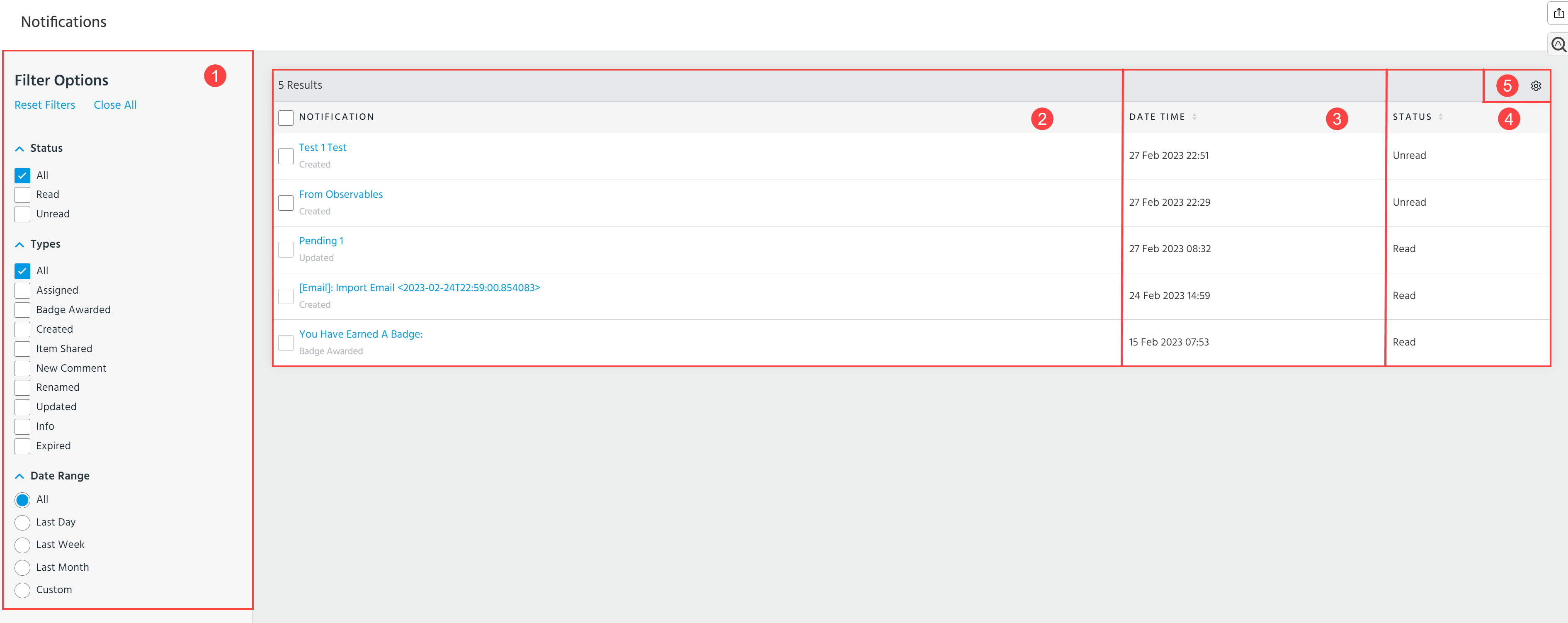
 Filter Options: Filter notifications on the list view by Status, Types, and Date Range.
 Notification: Click the blue link to drill down on the entity referenced in the notification.
 Date Time: Time the notification was received.
 Status: Status of the notification—whether you have already read the notification or if it is pending review. To assign the Read status to a notification with the Unread status, select a notification of your interest and click Mark as READ. The status of read notifications cannot be changed.

 Table Settings: Select what table columns you want to be displayed. You can select the following columns: Notification, Date Time, and Status. Additionally, specify how many notifications (rows) you want to be displayed per page.
Notification Types
The table below describes the types of in-app notifications on ThreatStream and whether you are automatically subscribed or must opt-in to receive them.
| Notification | Description | Subscription |
|---|---|---|
| Badges |
Displays notifications when you earn new badges commemorating your threat intelligence achievements. For more information on badges, see Earning Badges. |
Automatic |
| Watched Intelligence |
Displays notifications when intelligence you have watched is updated. For more information on watching intelligence, see Watching Intelligence. |
Automatic |
| Shared Intelligence |
Displays notifications when a user in your organization shares intelligence with you. For more information on watching intelligence, see Sharing Intelligence. |
Automatic |
| Threat Models |
ThreatStream enables you to receive in app notifications for the following scenarios:
You can opt-in to receive these in app notifications from the My Account tab within ThreatStream settings. See Receiving Notifications from ThreatStream for more information. |
Opt-in |
| Investigations |
ThreatStream enables you to receive in app notifications for the following scenarios:
You can opt-in to receive these in app notifications from the My Account tab within ThreatStream settings. See Receiving Notifications from ThreatStream for more information. |
Opt-in |
| App Store |
ThreatStream enables you to receive in app notifications for the following scenarios:
You can opt-in to receive feed notifications from the My Account tab within ThreatStream settings. See Receiving Notifications from ThreatStream for more information. |
Opt-in |